The New Relic Elasticsearch OpenTelemetry (OTel) integration provides comprehensive observability for your Elasticsearch clusters using industry-standard OpenTelemetry protocols. By leveraging the OpenTelemetry Collector, you get a unified pipeline that efficiently collects both metrics and logs from your Elasticsearch infrastructure, ensuring fast and reliable monitoring that integrates directly with New Relic.
Important
Choose your monitoring approach: This OpenTelemetry-based integration offers modern, vendor-neutral monitoring. If you prefer our traditional approach or need specific compatibility, see our standard Elasticsearch integration.
Why choose this OpenTelemetry approach?
- Unified data collection: Single collector handles metrics, logs, and traces from Elasticsearch and host systems.
- Vendor neutrality: Uses open-source standards that work with any observability platform - no vendor lock-in.
- High performance: Built-in batching, compression, and cardinality reduction minimize resource impact.
- Future-proof architecture: Built on evolving open standards that adapt as your infrastructure grows.
- Native New Relic integration: Optimized data processing and seamless dashboard experience.
Use case: An e-commerce company uses Elasticsearch for their product search feature. Using this integration, their operations team can see if their search service is healthy, how fast searches are responding, and get notified before memory runs out - all from one dashboard. When customers start complaining about slow search results, the team can quickly see if it's an Elasticsearch problem, a server issue, or something else by viewing all their monitoring data together.
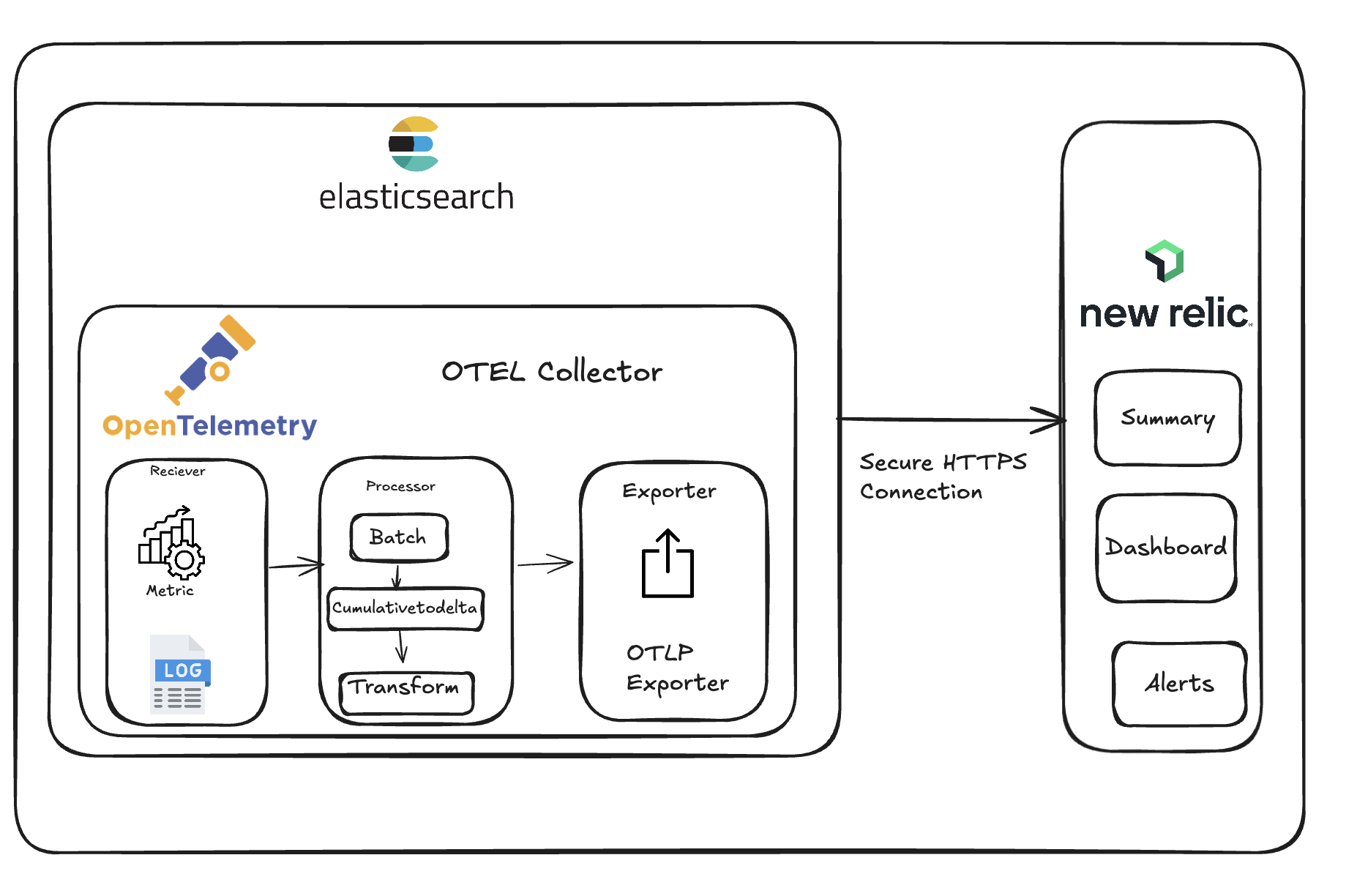
What you'll get
Monitor your Elasticsearch infrastructure with:
- Cluster health monitoring: Track node status, shard distribution, and cluster state in real-time.
- Performance insights: Monitor search latency, indexing rates, and JVM performance metrics.
- Resource utilization: View CPU, memory, disk, and network usage across all nodes.
- Proactive alerting: Get notified before issues impact your users with intelligent thresholds.
- Full-stack correlation: Connect Elasticsearch metrics with application and infrastructure data.
Get started
Ready to monitor your Elasticsearch cluster? Choose the installation method that matches your environment:
On-host installation: Install Elasticsearch OpenTelemetry integration - For Elasticsearch running directly on servers or VMs.
Kubernetes installation: Monitor Elasticsearch on Kubernetes - For containerized Elasticsearch deployments using automatic pod discovery.
Metrics and data reference
The Elasticsearch OpenTelemetry integration collects over 50 metrics covering cluster health, performance, JVM statistics, and infrastructure monitoring. These metrics help you monitor critical aspects like shard distribution, search latency, memory usage, and resource utilization.
For detailed information about all available metrics, their descriptions, and how your data is organized in New Relic, see the Elasticsearch metrics reference.
Next steps
Ready to start monitoring your Elasticsearch cluster? Follow these steps to get comprehensive observability:
Choose your installation method:
- Host installation - For Elasticsearch running on servers or VMs
- Kubernetes installation - For containerized deployments with automatic pod discovery
Explore your data - Learn how to find metrics in New Relic UI and create custom NRQL queries
Review the metrics reference - Understand all available metrics for cluster health, performance, and infrastructure monitoring