avance
Todavía estamos trabajando en esta característica, ¡pero nos encantaría que la probaras!
Esta característica se proporciona actualmente como parte de un programa de vista previa de conformidad con nuestras políticas de prelanzamiento.
Los entornos modernos Kubernetes evolucionaron hacia flotas complejas de múltiples clústeres, pero las herramientas de observabilidad tradicionales a menudo brindan solo una vista fragmentada y aislada de cada clúster individual. Esta UI entre clústeres Kubernetes proporciona un centro de comando unificado que transforma esta complejidad de múltiples clústeres en claridad para toda la flota.
Esta vista unificada ayuda a Plataforma Ingeniero y SRE a:
- Unifique la observabilidad de toda la flota en un solo dashboard que sea compatible con el clúster monitoreado por el agente New Relic o OpenTelemetry.
- Acelere el análisis de causa raíz con un flujo de trabajo de clasificación guiado.
- Reduzca costos identificando recursos desperdiciados en toda la flota.
- Ofrezca a los desarrolladores una vista centrada en la aplicación para el autoservicio.
Acceda a la nueva UI
Puede acceder a la nueva UI entre clústeres Kubernetes desde la opción Kubernetes en la navegación izquierda en la plataforma New Relic.
Para acceder a la UI entre clústeres Kubernetes :
- Ir a one.newrelic.com > All capabilities > Kubernetes
- Haga clic en el botón Try it out en la esquina superior derecha de la página.
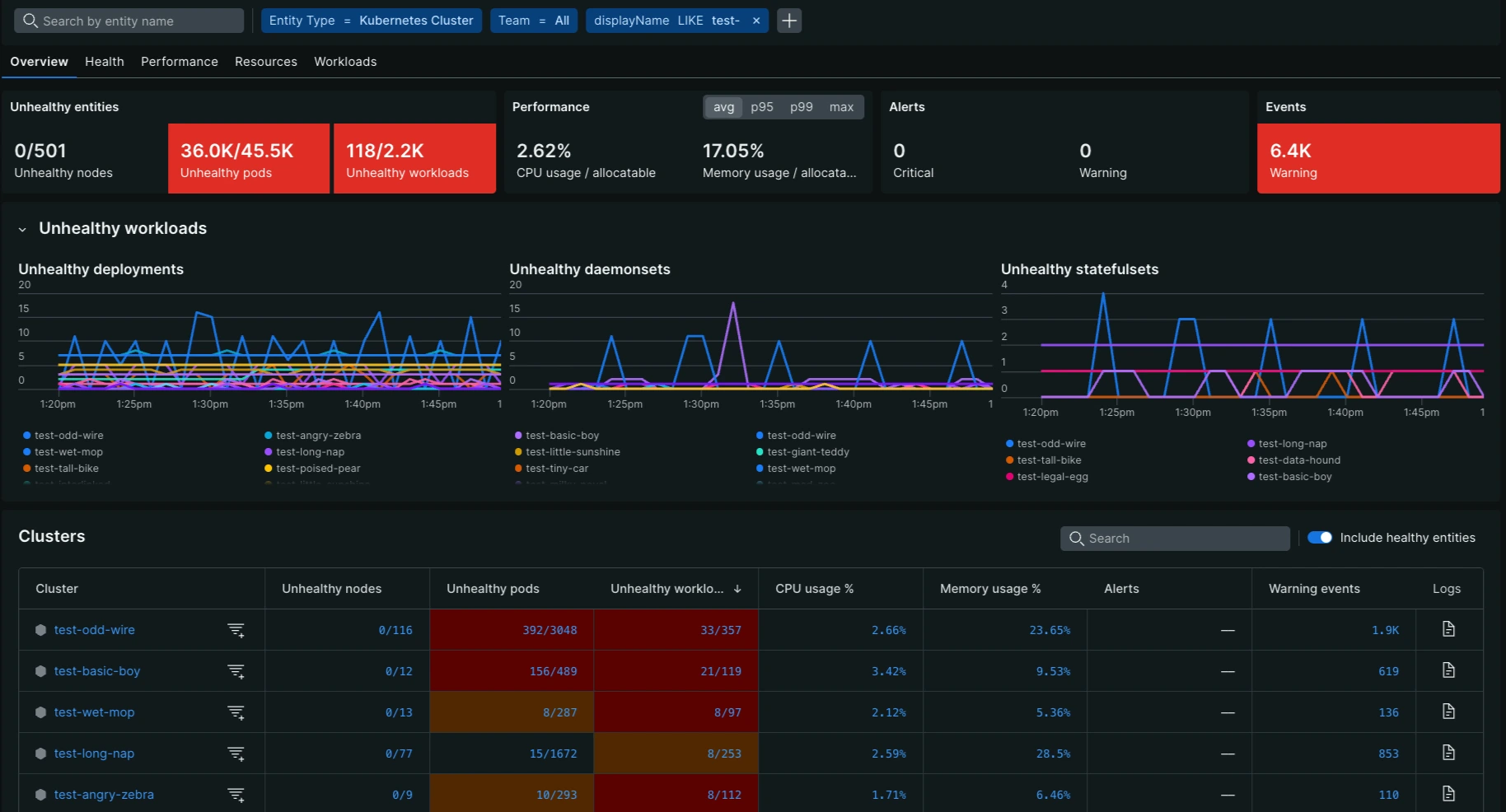
La UI entre clústeres Kubernetes está estructurada para brindar una descripción general de alto nivel y capacidades de análisis profundo de toda su flota Kubernetes. Los componentes principales de la UI incluyen:
Botón de comentarios: le permite compartir fácilmente comentarios sobre su experiencia con la UI.
Filtros de entidad: Filtra y clasifica problemas usando etiquetas y valores a nivel de clúster o nodo.
- FiltroCluster : filtro para aislar la UI a un solo conjunto o a un conjunto más pequeño de clústeres de Kubernetes.
Tarjetas de puntaje de colores: muestra métricas relevantes de alto nivel para resaltar los problemas más importantes que requieren atención en toda la flota.
- Al hacer clic en un cuadro de mando se ordena la tabla en el contexto de esa métrica, mostrando el clúster y los nodos con los problemas más críticos en la parte superior.
- También permite un gráfico de líneas para visualizar la evolución de la métrica durante el rango de tiempo seleccionado.
Gráfico de líneas: proporciona la evolución de la métrica durante el periodo de tiempo seleccionado para el análisis de tendencias.
Tabla: enumera todas las entidades de la flota y proporciona datos métricos detallados para cada clúster en las cinco pestañas principales.
- Enfoque de salud: La tabla proporciona un filtro para listar solo las entidades "no saludables" para enfocar su atención donde realmente es necesario.
- Buscar: una barra de búsqueda de texto le permite filtrar filas de la tabla según el texto libre ingresado.
- Codificación de colores: al igual que los cuadros de mando, las celdas de la tabla están codificadas por colores (amarillo, rojo) para llamar rápidamente la atención sobre las entidades con problemas que cumplen con un umbral de gravedad específico.
Capacidades de desglose para triaje
La UI entre clústeres está diseñada específicamente para acelerar el análisis de la causa raíz con un flujo de trabajo de clasificación guiado. El mecanismo principal para esta investigación profunda es la capacidad de explorar en profundidad desde una métrica de toda la flota hasta la vista de un solo clúster:
- De cuadro de mando a clasificación de clúster: cuando hace clic en un cuadro de mando de color (por ejemplo, pod no saludable), la tabla de clúster se reordena inmediatamente. Esto coloca al clúster con el peor rendimiento para esa métrica específica en la parte superior, lo que le permite identificar dónde es más crítico el problema en toda su flota.
- De la tabla métrica al navegador Kubernetes : haga clic en un valor métrico dentro de cualquier celda de la tabla de un clúster o nodo específico para iniciar automáticamente el navegadorKubernetes . La vista del navegador se predefine/filtra automáticamente para ese clúster y métrica específicos de interés, lo que le permite continuar su investigación con un análisis profundo.
Métrica específica de la pestaña
La UI está organizada en cinco pestañas principales:
Cada pestaña proporciona métricas específicas tanto a nivel agregado (Scorecard) como de clúster/nodo (métrica), junto con su umbral codificado por colores asociado para una clasificación rápida.