In this section, you'll explore the ingest pipeline architecture, which visually represents how your telemetry data flows through the system. You'll see how using gateway and cloud rules can impact data volume and optimize your data management strategy.
Components of your ingest pipeline
MELT sources:
- Metrics, Events, Logs, and Traces (MELT): These are the primary types of observability data you collect from various sources. They form the starting point of your ingest pipeline.
Data flow lines:
- Lines emanate from each MELT source, representing the data being sent to the NRDB. Each line is annotated with a data volume, measured in millions (M), indicating the amount of data volume in transit.
Gateway:
- Positioned between MELT sources and cloud rules, the gateway acts as a filter, applying your user-defined rules to drop low-value data before it exits your network. This reduces the data volume sent to the NRDB, optimizing storage and egress costs.
Cloud rules:
- Cloud rules are applied within the New Relic Cloud, further filtering data before it reaches the NRDB. The diagram indicates the number of operational cloud rules.
NRDB:
- The New Relic Database (NRDB) is the final destination for processed data. It stores the refined telemetry data, ready for your analysis and visualization.
Visual representation
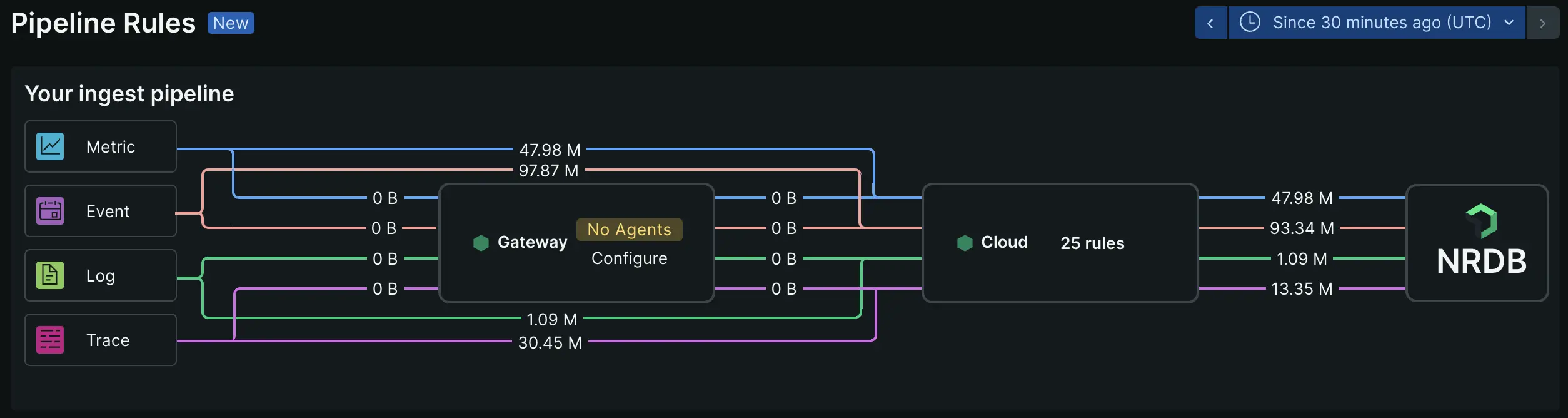
The ingest pipeline view is organized into three main sections that show your data processing workflow:
Sources:
- Displays the telemetry types (Metrics, Event & Logs, Traces) that agents and collectors send to New Relic. This shows the entry points for your observability data.
Gateway:
- Shows the processor configuration cards that transform and filter your data. Each processor (Sample Rule, Filter, Transform) displays its current configuration status and rules. You can view and manage how data is processed before it leaves your infrastructure.
Cloud:
- Indicates cloud rules running in New Relic's infrastructure. This shows additional filtering applied after data reaches New Relic endpoints.
The view provides a clear workflow visualization of your pipeline configuration, showing which processing rules are active at each stage. Select any processor card to view detailed configuration or modify rules.