Service maturity transforms a Scorecard from a flat, pass/fail percentage into a structured improvement path. Instead of treating every rule equally, a Scorecard's rules are grouped into maturity levels and, optionally, assigned individual weights. This provides development teams with a clear, prioritized roadmap: rather than attempting to resolve every alert simultaneously, a service moves systematically through defined stages of quality, from meeting minimum operational standards to demonstrating operational excellence.
How service maturity works
Every rule in a Scorecard belongs to a single maturity level. As an entity (such as a service) passes the rules at each level, it progresses up the maturity ladder for that Scorecard. Two independent concepts drive this:
- Maturity levels organize rules into stages and determine the derived maturity of an entity.
- Weighted scoring determines how much each rule contributes to the Scorecard's overall score.
These two concepts function independently: maturity tracks which technical standards a service meets, while weight governs how much a rule impacts the numerical score.
Maturity levels
By default, a Scorecard has three maturity levels. New Relic uses these to describe the lifecycle of a service:
Maturity level | Description |
|---|---|
Basic (the floor) | The minimum, non-negotiable operational standard. Services at this level meet all core compliance, security, and ownership checks. If a service fails a Basic rule, it isn't considered production-ready. |
Intermediate (the standard) | The expected standard for a stable, mature service. It includes best practices for reliability, continuous delivery, and comprehensive monitoring, backed by strong automation and documentation. |
Advanced (the aspirational) | The elite standard for excellence. These services demonstrate proactive optimization, strict SLO adherence, and are built to be future-proofed against anticipated growth. |
Maturity levels can be created, renamed, and reordered. A single Scorecard can support between 1 and 5 distinct levels. Because customizing levels beyond the default three is only available through the API, see Manage maturity levels with the API for configuration instructions.
Entity maturity
Each entity is assigned a maturity level per Scorecard, which New Relic derives from the rules that entity passes:
- An entity achieves a maturity level only when it passes all rules at that level and every level below it. For example, an entity that passes all Basic and all Intermediate rules has Intermediate maturity.
- An entity that fails any Basic rule is Below basic, meaning it hasn't met your minimum operational standard.
Entity maturity is purely organizational: it changes how entities and rules are grouped and displayed, but it does not change the Scorecard's numerical score.
Weighted scoring
Not all rules are equally important. Each rule has an integer weight (impactWeight), and a Scorecard's overall score is the weighted average of its rules' individual scores:
Not all rules carry equal operational importance. Each rule includes an integer weight (impactWeight), and the overall score of a Scorecard is calculated as the weighted average of the individual scores of its rules:
Scorecard score = (sum of each rule's score x its weight) / (sum of all weights)A few things to know about the weight value:
- It's a relative multiplier, not a percentage. A weight of
20doesn't mean 20%; it means that rule counts twice as much as a rule with weight10, and the same as weights of2and1. Only the ratio between rule weights matters. - The default weight is
1, so when every rule has the same weight, the Scorecard score is a simple (unweighted) average of the rule scores. - Weight is an integer between
1and100. - Weight affects the score only; it does not change an entity's maturity level.
For example, a Scorecard has three rules, each with its own score and weight:
Rule | Rule score | Weight |
|---|---|---|
Critical security check | 90% | 5 |
Alerting configured | 60% | 3 |
Documentation link present | 40% | 1 |
The Scorecard's overall score is the weighted average of those rule scores:
(90 × 5) + (60 × 3) + (40 × 1) 670------------------------------ = --- ≈ 74% 5 + 3 + 1 9Because the critical security rule carries the most weight, the Scorecard score (≈74%) sits closer to that rule's score than a plain, unweighted average would ((90 + 60 + 40) / 3 ≈ 63%).
ヒント
Rule weights are set through the API, not the UI. To assign weights, see Manage maturity levels with the API and the NerdGraph Scorecards tutorial.
Define maturity levels
When you create a Scorecard, the creation wizard includes a Define maturity levels step. Here you rank your rules by importance by dragging and dropping them into each maturity bucket. As entities pass the rules in each bucket, they improve their standing at that maturity level.
To assign rules to maturity levels in the UI:
- Create a Scorecard from a template or build your own. For the full flow, see Create a new Scorecard.
- On the Define maturity levels step, drag and drop each rule into the appropriate bucket: Below basic, Basic maturity, Intermediate maturity, or Advanced maturity.
- Continue to Review & save to create the Scorecard.
You can change a rule's maturity level later by editing the rule. To set rule weights, or to create custom maturity levels beyond the default three, use the API. See Manage maturity levels with the API.
View service maturity in a Scorecard
A single Scorecard offers two views that surface maturity: Rule view and Entity view. You can switch between them in the top-right of the Scorecard.
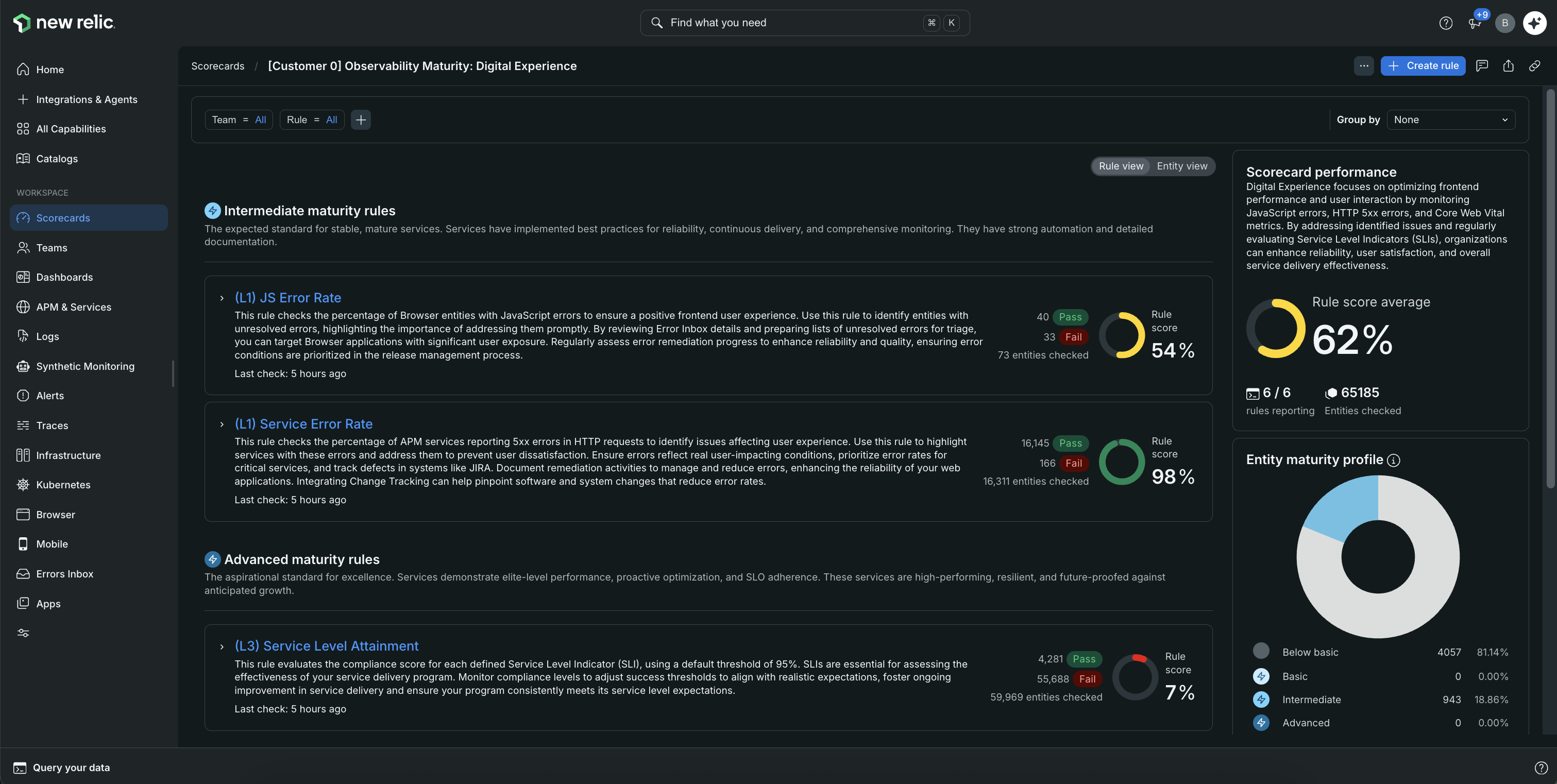
Rule view
Rule view groups a Scorecard's rules by maturity level (Basic, Intermediate, and Advanced), so you can see how your rules are distributed and how each rule is performing. The side panel summarizes overall Scorecard performance, the Maturity level distribution across your entities, an Entity maturity profile, and rule performance over time.
Entity view
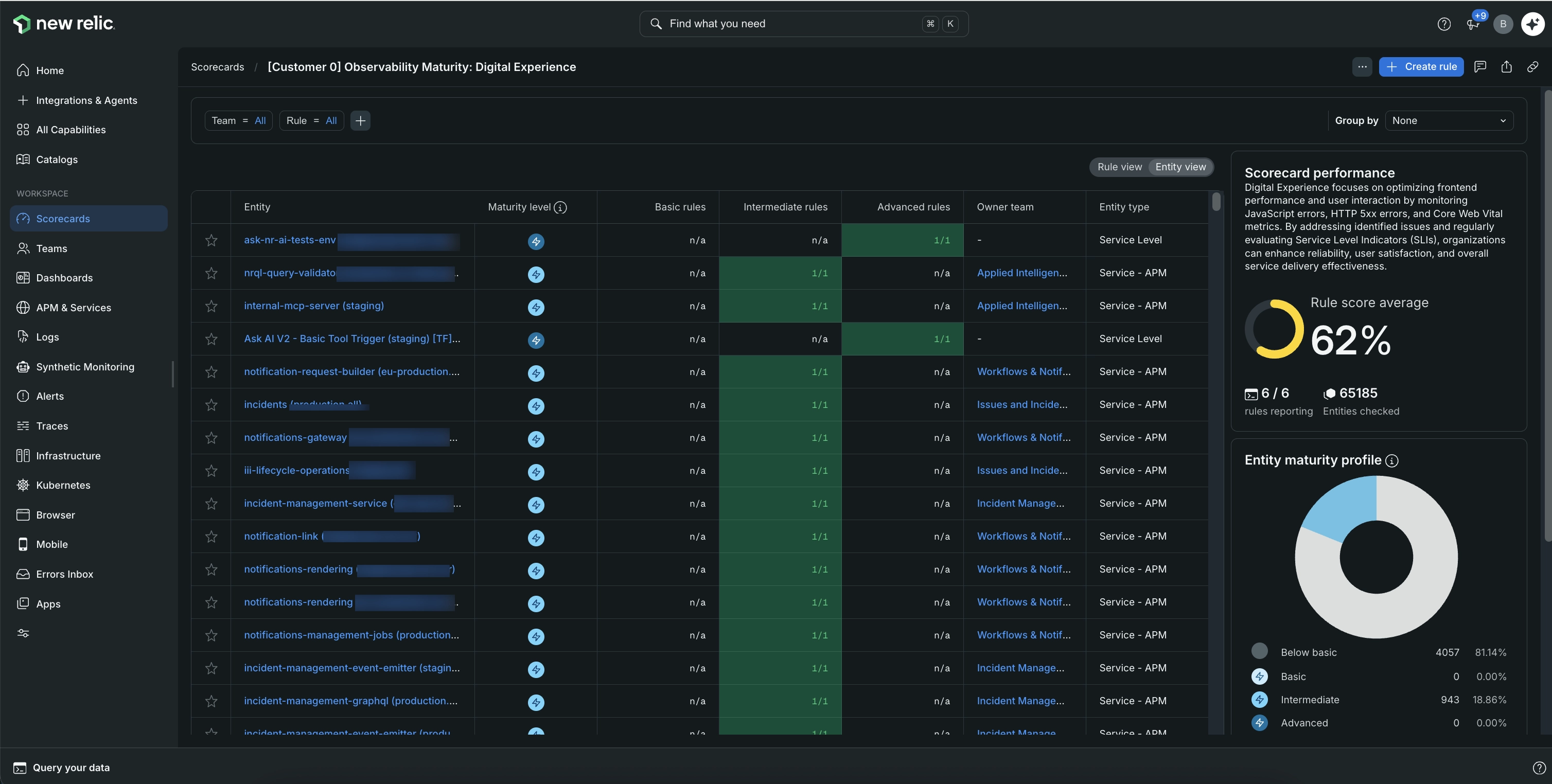
Entity view lists every entity evaluated by the Scorecard with a Maturity column and a per-level breakdown of how many rules each entity passes (for example, Basic rules 2/2, Intermediate 1/1, Advanced 0/1). This lets managers filter to their services and see exactly where each one sits on the maturity ladder.
Progress a service across levels
Maturity levels give teams a clear next step. Instead of chasing an abstract percentage, a team can focus on a concrete goal, such as moving a service from Basic to Intermediate by the end of a sprint.
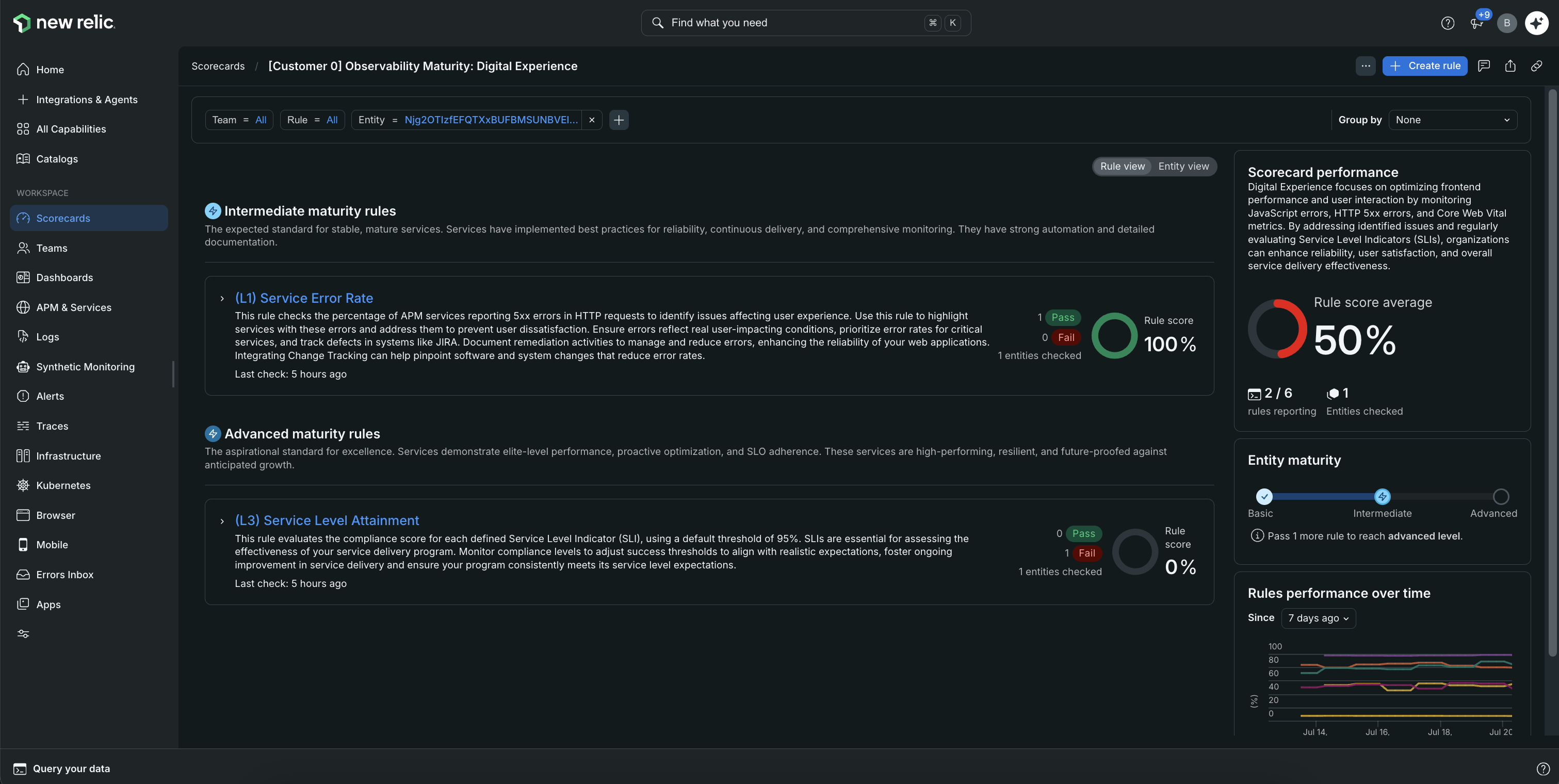
When you filter a Scorecard to a single entity, the side panel shows that entity's current maturity as a progression from Basic to Intermediate to Advanced, along with how many deficiencies remain to reach the next level (for example, "Resolve 1 deficiency to reach basic maturity"). The rules are grouped by maturity level so the team can see exactly which checks to address next.
Service maturity in catalogs
Maturity also appears in your catalogs. When you open an entity's detail, you can see its maturity level for each Scorecard it belongs to (for example, "Below basic" for one Scorecard and "Advanced" for another), so you get a quick read of a service's standing across all of your standards.
Manage maturity levels with the API
You can create, read, update, and delete maturity levels and rule weights through the NerdGraph API. In the API, maturity levels are called progress levels:
- A Scorecard's maturity levels are defined by its
progressLevels. - A rule's maturity level is set with
progressLevel, and its weight is set withimpactWeight.
The API is the only way to set rule weights and to create custom (non-default) maturity levels, such as adding a fourth level or renaming the default three. For the mutations and examples, see the NerdGraph Scorecards tutorial.