The New Relic Java agent reads its configuration from the newrelic.yml file. By default the agent looks for this file in the directory that contains newrelic.jar. You can override the config file's location by setting the newrelic.config.file system property to a fully qualified file name.
You'll be able to configure our Java agent to suit your environment after you create a New Relic account (it's free, forever) and install the Java agent.
Configuration file structure
The newrelic.yml file has separate sections for different environments:
- Test
- Development
- Staging
- Production (default)
New Relic applies settings in the common section to each of these environments. You can select other environments as the default by setting the newrelic.environment system property to the environment name.
Dica
A newrelic.yml template is available.
If you edit newrelic.yml, be careful to conform to the YAML format. Use a YAML validator to ensure the syntax is accurate before using the file with New Relic's Java agent, and follow these rules:
Java agent newrelic.yml | Requirements |
|---|---|
Format | YML files are case sensitive. |
Indentations | All indentations must be in increments of two characters. Other indentations will result in an
|
Changes to file | You must restart your JVM host process for changes to take effect. Exception: Property changes to |
Configuration settings precedence
To override any setting in the config file, use a system property override. In certain environments, environment variables can also be used to override both the config file and the system properties. The environment variables primarily exist to support Heroku. When used, server-side configuration overrides all other configuration settings.
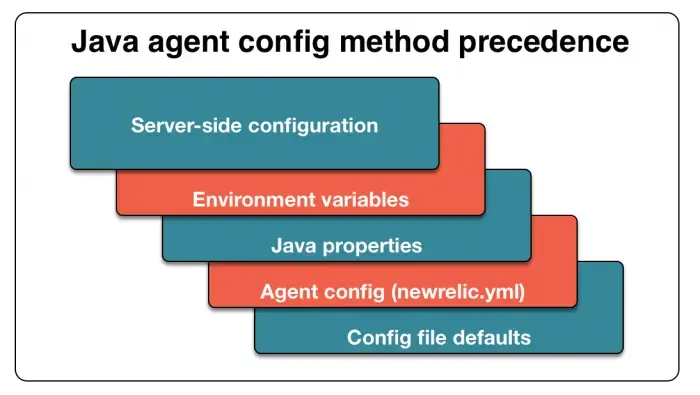
With the Java agent, server-side configuration overrides all other settings. Environment variables override Java system properties. Java properties override user configuration settings in your newrelic.yml file. User settings override the newrelic.yml default settings.
Configuring the Java extensions directory
The Java agent reads the configuration files on process startup. To identify the directory where the files are located, either create a new or specify an existing extensions directory:
Settings index
The following pages contain the full settings reference for each configuration area:
| Settings page | Description |
|---|---|
| General settings | Core settings: license key, app name, proxy, high security, extensions |
| Transaction tracer settings | Transaction tracing, SQL capture, transaction events, segments, message tracer |
| Error collector settings | Error collection, ignore/expected classes and status codes, errors inbox |
| Distributed tracing settings | Distributed tracing, Infinite Tracing, span events, cross application tracer |
| Logs in context settings | Log forwarding, log metrics, local decorating, logging configuration |
| Attributes settings | Attribute filtering, include/exclude lists, HTTP attribute mode |
| Security settings | IAST security agent, vulnerability detection settings |
| AI monitoring settings | AI monitoring and LLM content recording |
| Browser monitoring settings | Browser agent auto-instrumentation and attribute configuration |
| Async instrumentation settings | Async token and segment timeout configuration |
| OpenTelemetry settings | OpenTelemetry traces, metrics, and logs signal configuration |
| JFR settings | Java Flight Recorder real-time profiling |
| Class transformer settings | Spring transaction naming, trace annotations, lambda tracing |
| JMX settings | JMX monitoring and linking metadata |
| Other settings | Circuit breaker, cloud config, utilization, custom events, jar collector, JVM obfuscation, thread profiler, and more |
Importante
The two settings you must configure are your app name and license key — set via app_name and license_key in newrelic.yml (or the NEW_RELIC_APP_NAME and NEW_RELIC_LICENSE_KEY environment variables). All other settings are optional.