Monitor your NGINX Plus servers running on a host using the NRDOT collector (recommended) or OpenTelemetry Collector to send metrics and telemetry data to New Relic.
This integration leverages the OpenTelemetry prometheusreceiver and nginx-prometheus-exporter to monitor your NGINX Plus performance metrics, connection statistics, and server health. The rich HTTP API in NGINX Plus provides significantly more detailed metrics compared to the basic stub status module in standard NGINX.
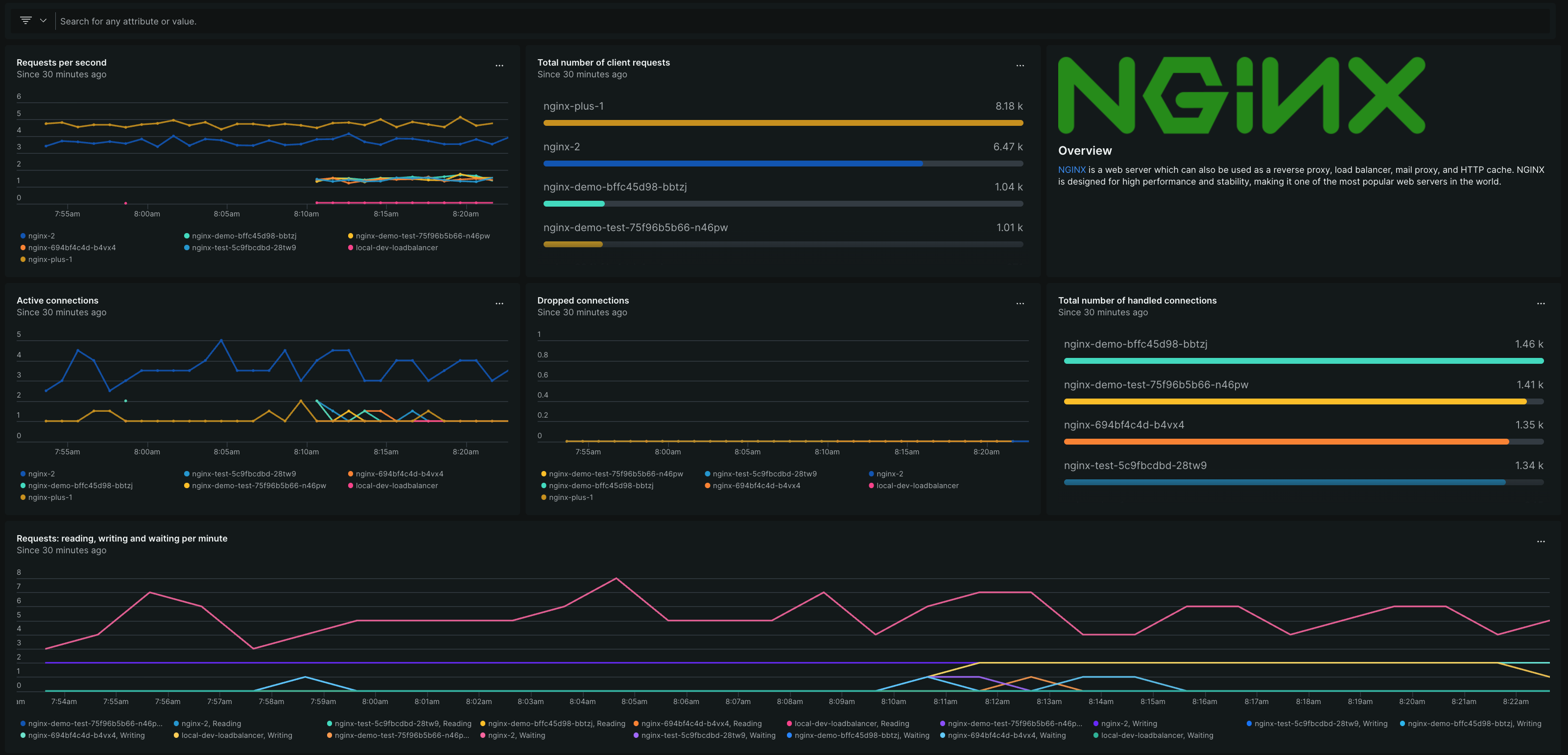
Dashboard available through the New Relic NGINX OpenTelemetry Monitor quickstart.
Before you begin
Ensure you have:
- Valid New Relic license key
- NGINX Plus version R13 or higher
- NGINX Plus with the HTTP API module enabled
- NGINX Prometheus exporter installed and running alongside your NGINX Plus instance to expose HTTP API metrics in Prometheus format
- One of the following collectors installed on a Linux host:
- NRDOT collector (recommended - New Relic's OpenTelemetry distribution), or
- OpenTelemetry Collector Contrib (alternative option)
- Network access from the Linux host to:
- NGINX Plus HTTP API endpoint
- A New Relic OTLP endpoint
Set up NGINX Plus monitoring
Choose your preferred collector and follow the configuration steps:
Dica
If any verification step fails, install the missing components before continuing. Need help installing the NRDOT collector? Check the installation section of the nrdot-collector-releases repository.
During installation use export collector_distro="nrdot-collector"
Configure the NRDOT collector
Configure the NRDOT collector to scrape metrics from your NGINX Plus Prometheus exporter and send them to New Relic.
Configure environment and update config path
Update the NRDOT collector configuration to use your NGINX Plus config file and set the OTLP endpoint.
Determine your OTLP endpoint based on your New Relic region. See Configure endpoint, port, and protocol for the complete list of endpoints and supported ports for your region.
Importante
Your license key was already configured in /etc/nrdot-collector/nrdot-collector.conf during installation. You only need to update the config file path and OTLP endpoint.
Update the collector configuration file:
$export collector_distro="nrdot-collector"$export otlp_endpoint="YOUR_NEWRELIC_OTLP_ENDPOINT"  # Replace with your region's endpoint$
$# Update the config file path to point to nginx-plus-config.yaml$sudo sed -i 's|OTELCOL_OPTIONS="--config=/etc/nrdot-collector/config.yaml"|OTELCOL_OPTIONS="--config=/etc/nrdot-collector/nginx-plus-config.yaml"|' /etc/${collector_distro}/${collector_distro}.conf$
$# Add the OTLP endpoint$echo "OTEL_EXPORTER_OTLP_ENDPOINT=${otlp_endpoint}" | sudo tee -a /etc/${collector_distro}/${collector_distro}.conf > /dev/null(Optional) Forward NGINX logs
Extend your collector configuration to include access and error logs if you want log events alongside metrics.
Start monitoring
Now that everything is configured, start the NRDOT collector and verify that data is flowing to New Relic.
Dica
If any verification step fails, install the missing components before continuing. Need help installing the collector? Check the OpenTelemetry Collector installation guide.
Configure the OpenTelemetry Collector
Configure the OpenTelemetry Collector to scrape metrics from your NGINX Plus Prometheus exporter and send them to New Relic.
Set up authentication
Configure secure authentication so the OpenTelemetry Collector can send data to your New Relic account. This step sets up environment variables to keep your credentials secure.
Get your New Relic credentials:
- License Key: Get your license key from the API Keys UI page
- OTLP Endpoint: Use your region's endpoint from New Relic OTLP endpoints
Configure the credentials:
Create a systemd override directory:
bash$export collector_distro="otelcol-contrib"$sudo mkdir -p /etc/systemd/system/${collector_distro}.service.dCreate the environment configuration file:
bash$cat <<EOF | sudo tee /etc/systemd/system/${collector_distro}.service.d/environment.conf$[Service]$Environment="NEWRELIC_OTLP_ENDPOINT=<`YOUR_NEWRELIC_OTLP_ENDPOINT>`"$Environment="NEWRELIC_LICENSE_KEY=`<YOUR_NEW_RELIC_LICENSE_KEY>`"$EOF
(Optional) Forward NGINX logs
Extend your collector configuration to include access and error logs if you want log events alongside metrics.
Start monitoring
Now that everything is configured, start the OpenTelemetry Collector and verify that data is flowing to New Relic.
Find and use data
- Go to one.newrelic.com > Integrations & Agents.
- Select Dashboards, and click NGINX (OpenTelemetry Collector) dashboard.
- In the popup window, select your account.
- Click View dashboard, and see your NGINX Plus data in New Relic.
The NGINX Plus metrics are attached to the Metric event type. You can query this data for troubleshooting purposes or to create custom charts and dashboards.
Metrics collected
The OpenTelemetry Collector scrapes metrics from the NGINX Prometheus exporter, which exposes NGINX Plus HTTP API metrics in Prometheus format.
Below are the available NGINX Plus metrics:
Next steps
Learn more about your data:
- Find and query your NGINX data - Access dashboards, create custom queries, and set up alerts
- Introduction to NRQL - Learn New Relic's query language for advanced data analysis
- Create NRQL alert conditions - Set up custom alerts based on your NGINX Plus metrics
Explore related monitoring:
- Monitor self-hosted NGINX with OpenTelemetry - For standard NGINX deployments
- Monitor NGINX on Kubernetes with OpenTelemetry - For containerized environments